Thursday, October 11, 2012

Tech Tools for Teachers: Social-bookmarking

http://img.scoop.it/dHrKGowkQ3akYetwafybcjl72eJkfbmt4t8yenImKBVaiQDB_Rd1H6kmuBWtceBJ
Nik Peachey explores social-bookmarking and how we can use it to save bookmarks online to access them from any computer. Nik provides a comprehensive overview article on the use of social-bookmarking, including a list of tools to collate web pages like scrible and Delicious, a downloadable lesson plan, a video screencast tutorial and a printable how-to guide.

More than 1,500 learning institutions now using Amazon Web Services


Amazon Web Services has announced at the AWS Public Sector Summit in Washington, DC that more than 300 government agencies and 1,500 education institutions are leveraging AWS for a wide range of uses including big data analytics, high performance computing, web and collaboration applications, archiving and storage, and disaster relief.

myEDU launches new tools to help college students connect with employers


Online student platform MyEDU has announced the launch of MyEdu Student Profile and MyEdu for Employers.

Wednesday, October 10, 2012

50 Education Leaders Worth Following On Twitter


How do you discover the education news and research that matters to you? Probably by curating a list of the top thought leaders, local people you want to keep track of, and a smattering of other helpful folks.

ePals launches World Election Center for students


Education media’s ePals corporation oday announced the launch of the ePals World Elections Center, designed to involve students in a range of interactive activities to help them learn about election processes, candidates and issues globally.

Sunday, October 7, 2012

It’s Tablet Time: K-12 Students Find Learning Advantages

The use of tablet computers in K-12 schools is rapidly increasing. And they’re changing the dynamics of the learning environment in significant ways. Their small size enables students to move between learning spaces without difficulty—whether those spaces are in school, at home or elsewhere. And while they are not a replacement for laptops or desktop computers, especially for content creation, they promise to make learning more fun and interactive for young students.

Saturday, October 6, 2012

5 Tips to Make Rapid E-Learning Interactive


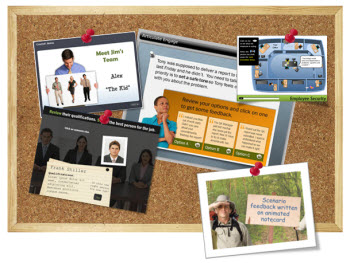
Articulate Rapid E-Learning Blog - 5 tips to make rapid elearning interactive

When building rapid elearning with PowerPoint it can be a challenge to get away from linear courses. For one, PowerPoint’s original intent is creating presentations. And they are usually linear. On top of that, many of us have limited time and resources. So building linear, info-centric courses tends to be an easier way to get the projects out the door.

Top 100 Tools for Learning 2012


A learning tool is a tool to create or deliver learning content/solutions for others, or a tool for your own personal or professional learning.
Here is the Top 100 Tools for Learning 2012 as voted for by 582 learning professionals worldwide.

This year  I’ve highlighted where the Top 100 Tools are mainly being used – ie for Personal/Professional use, in Education and/or in the Enterprise.  (Please note that the absence of a checkmark in a column does not mean that the tool is not, cannot or should not be used for that purpose!)

Touch-Screen Tablets: The Perfect Tech for Kindergarteners


Using technology that lets our youngest students get hands-on with learning at an early age makes sense.

Think about one of the main activities most people associate with kindergarten: finger painting. It’s a simple, messy, fun way for kindergarteners to learn about color and expand the boundaries of their imagination.
But with tablets, and an app that simulates finger painting, teachers can unleash the artistic potential of their fresh-eyed students — without all of the usual mess and cleanup.

Google Announces 100 Live Hangouts For Teachers Around The World

Google is celebrating World Teachers’ Day with a couple big announcements. In an effort to increase the connections between educators and learners around the world, they’ve assembled a whole slew of interesting Google+ Hangouts as well as a daily topic for each day of the week.

From learning how to flip your classroom to chatting with Sal Khan, there will be hangouts for an array of interests. Here’s the skinny from Google:

Enabling classrooms to become successfully low tech

PHUKET: Approaches to education have changed quite dramatically in the past 60 years. Being able to recite your 23 Times Table, reel off capitals of obscure cities like Kiribati (Tarawa) and generally recall facts from rote learning was once seen by many as indicative of a ‘man of letters’.

Nowadays, however, modern approaches to learning incorporates everything from knowledge of brain anatomy to studies in holding attention spans based on approaches learned from video games and keeping classrooms at ideal room temperatures.

Friday, October 5, 2012

iPad trumps PC in sales to schools for first time: Report

PC sales to schools in the U.S. are seeing its long-established lead in the education market overtaken by Apple’s iPad, according to a new report.
While PC education shipments fell by 265,000 units, or 13.9 percent, from the June quarter a year ago, Apple sold almost a million iPads to K-12 in June, according to a note to investors sent by Needham & Company analyst Charles Wolf.

New technology brings new approach to teaching


It's no surprise that innovative technology has revolutionized the way we perform many tasks in our everyday lives, and the use of technology in college education is no exception. The standard university education has been given a much-needed facelift, integrating social media, handheld devices and online courses into its already rigorous curriculum.

Employee EdTech: Learn27 Education Platform


Learn27 is not for kids. It still counts as education technology, only for employees working in businesses that already spend too much on that exact thing.
Learn 27 is an e-learning startup that allows any organization to create a virtual learning center and offer relevant courses. A business can set up a professional account and create a kind of tech academy that benefits from collaborative learning. You can get feedback from other employees and partners and upload instructional videos and text information.
Like several learning platforms these days, Learn27 gamifies their curriculum, including badges and points to keep folks motivated. (For more on the idea of badging, read one of our earlier articles.)

Thursday, October 4, 2012

Here is What Students Can Do with an iPad

http://www.gpb.org/files/imagecache/340x255/ipad-class.jpg
iPads can be used to house digital textbooks, watch videos, manipulate images, create podcasts and more. The sky is the limit. But how does this actually connect to learning objectives in the classrooms?
I came across this wonderful post “What Students Can Actually Do with an iPad” on Edudemicby Beth Holland that lays out some great ideas.

Here is an example of how she and an English teacher used the iPad to master the concept of the story arc.

Boy sends robot to school in his place

 http://news.bbcimg.co.uk/media/images/63304000/jpg/_63304354_robot.jpg
A seven-year-old boy who is too ill to go to school has sent a robot to class in his place. 

Devon Carrow, from New York in America, uses the £3,000 'robo-swot' to answer his teachers' questions and take part in group discussions, all from the comfort of his home.
The high-tech gadget uses HD cameras to show Devon his classroom and he can signal when he wants to give an answer with a flashing light.

Some Schools Actually Want Students To Play With Their Smartphones In Class


 http://media.npr.org/assets/img/2012/10/02/img_0588-copy-copy-a8ab9f391bc631562ba04b5c41ca17c0866ea82d-s3.jpg

If there is one thing that the mobile-computing era has made clear, it's that kids love touch screens. Because those touch screens — smartphones, iPads, Kindles and the like — are an inevitable added distraction to the classroom, schools across the country are struggling to deal with the growing prevalence of the technology.
But a growing number of schools are embracing these hand-held, Internet-ready devices by creating policies that put them to use in the classroom.

College faculty integrate iPads into classrooms for innovative teaching


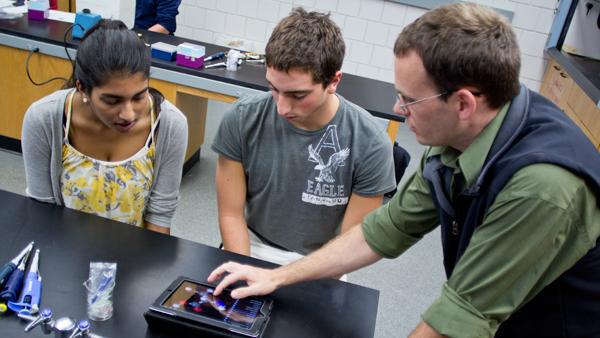
http://theithacan.org/wp-content/uploads/2012/10/Apple-iPad-Classroom-Biology-Molecules-SS.jpg

A different kind of apple is appearing on more and more teachers’ desks.Educators around the country at almost all academic levels are leaning toward utilizing Apple devices, like iPads, as predominant tools for learning and instruction.Following the Apple trend, Ithaca College has implemented a pilot program in which 40 iPads will be distributed to select faculty members — 20 in the fall and 20 in the spring — to help aid classroom instruction and collaboration.The program, which was developed through a collaborative effort by Information Technology Services and the Center for Faculty Excellence, was launched this semester. The goal is to “explore the use of tablet computing for their teaching, research and personal productivity,” as stated on the pilot program website. The pilot also aims to create a faculty iPad “community” through Sakai for instructional collaboration. Twenty professors across all five academic schools received their temporary iPads two weeks ago to use during the fall semester.Beth Rugg, assistant director of technology and instructional support services, said she believes the program will help the college gauge how it can better use portable devices to foster more in-depth instruction and learning.

Can you apply Google's 20% time in the classroom?


http://static.guim.co.uk/sys-images/Guardian/Pix/pictures/2012/10/3/1349265103170/Child-drawing-010.jpg


I love learning and am a big advocate of creativity. So when I read about Google's concept of '20% Time' I knew I had to find a way of sneaking it into the ethos of my classroom.

In short, Google offers its engineers 20% of their timetable to work on their own projects – things that they are truly passionate about and not things necessarily in their job description. Fairly radical. And I couldn't help thinking, if it works for Google, could it work for education?

22 Secrets from the Most Successful Online Educators

The fundamentals that define a great teacher don’t differ much whether classes are taught in the online setting or off, but there are certain things that need greater emphasis and gain greater importance when a teacher is working with students who aren’t in a traditional classroom setting. Knowing how to highlight these things to help students reach their potential and get more out of a course is what separates online teachers who are good from those who are great.